
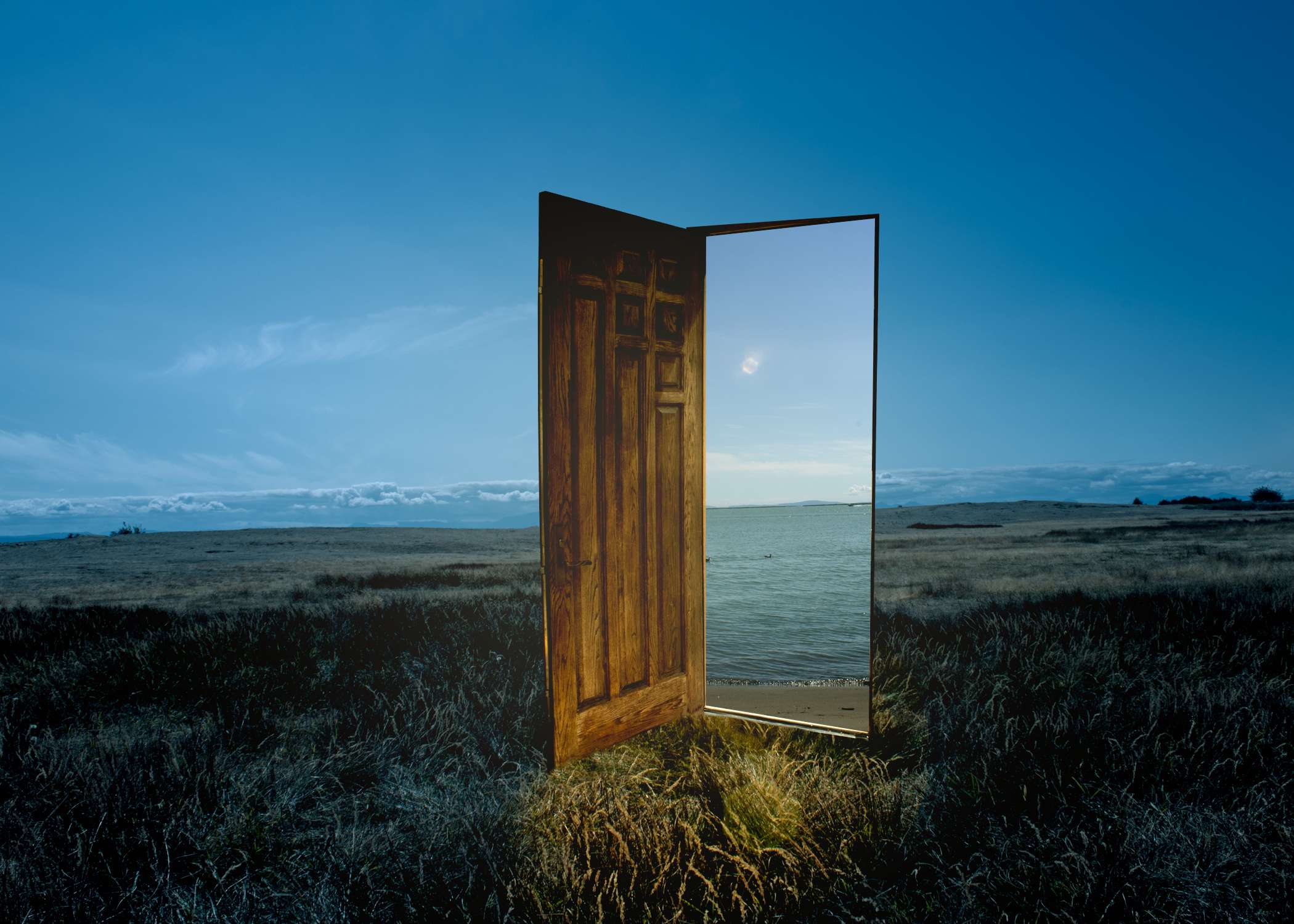
The main idea of this project was to capture at least two images and use Adobe Photoshop to create a composite photo. A composite photo is an image created from the combination of various photos.
Jonathan Fung - Photographer, Photo Editor
Adobe Photoshop
Canon T7 DSLR Camera
Around this time, I had just watched a movie, “Suzume,” a movie about a teenager, Suzume, working together with a mysterious man, Souta, to prevent disasters from across Japan by sealing doors from a supernatural creature. I decided to make my project based off the doors, as they were portals to another world. As a result, I wanted my project to be a portal to another world.


After coming up with my idea, I had to decide where I wanted to take the photos. I wanted a contrast between the world where the door was in and where the door leads to. I decided to have the outside to be dark in a forest or somewhere empty, with the inside being very warm, such as a beach. Originally, I wanted to go to a forest or park that was remote, but I couldn’t find a place like that nearby, so I used the alleyway behind my house. I experimented with different angles, locations, and the shutter speed of my camera to get a different look. The next day, I went to a beach to take more photos.
I went with two different shots of the beach, one with a view of the ocean, and the other focused on the plants and trees nearby.
After reviewing the photos, I wanted to use was the editing. I had to research on how to create a portal-like effect from scratch, instead of using a premade photo. However, no matter how many times I tried to create a portal, something looked off from the photo. It wasn’t blending in very well and looked very amateur and I decided to scrap the portal idea.


Going back to the drawing board, I thought of Suzume again, then decided to take a much easier approach to the project. I could just use the door as the portal instead of creating one using Photoshop. Similar to the image shown on the left. I took a photo of my front door to use as the portal.
Using the same beach photos as before, I started masking out anything unwanted in the background, such as objects, people, etc, using the healing brush. For the door photo, I had to mask out the background and what’s inside of the door so I can place the photo of the beach inside instead. Afterwards, I layered on the photo of the clean door on the field, with a mask of the beach inside of it. I used the clone stamping tool to clone grass to put in front of the door to give it a more realistic look.
Finally, it was color correcting, as the beach and field photos were very bright and had an orange hue to it. Then, I had an idea, the photo of the field was taken in the late afternoon instead of night, so I wanted to try and make it look like it’s nighttime instead of retaking the photo at night. The result looked better than I expected and adding in artificial sunlight coming through the door from the beach, made the photo pop out more.

This is what the photo looked like before the color correcting and lighting editing.
This is what the final result.
I am very happy with the final result of this project. I made the right choice to further edit the image by adding in the lighting effects, which gives it a more dramatic look and feel. I'm also glad I made a draft of a portal, as it gave me an idea whether or not I should continue to use a portal, or a door portal instead. Creating drafts of projects will definitely help me in the future to decide wheter or not I should change some details about projects.